Showing posts with label CSS. Show all posts

Sunday, 26 July 2020

Colour Names 1

It's common knowledge that web colour names are derived from the X11 colour names. But the relationship is in reality a series of compromises. Here's a comparison list:

ColourX11 Name(s)Web Name(s)RGB
    Alice Bluealiceblue#F0F8FF
    Antique Whiteantiquewhite#FAEBD7
    Aqua
Cyan
aqua
cyan
#00FFFFNote 1
    Aquamarineaquamarine#7FFFD4
    Azureazure#F0FFFF
    Beigebeige#F5F5DC
    Bisquebisque#FFE4C4
    Blackblack#000000
    Blanched Almondblanchedalmond#FFEBCD
    Blueblue#0000FF
    Blue Violetblueviolet#8A2BE2
    Brownbrown#A52A2A
    Burlywoodburlywood#DEB887
    Cadet Bluecadetblue#5F9EA0
    Chartreusechartreuse#7FFF00
    Chocolatechocolate#D2691E
    Coralcoral#FF7F50
    Cornflower Bluecornflowerblue#6495ED
    Cornsilkcornsilk#FFF8DC
    Crimsoncrimson#DC143C
    Dark Bluedarkblue#00008B
    Dark Cyandarkcyan#008B8B
    Dark Goldenroddarkgoldenrod#B8860B
    Dark Gray
Dark Grey
darkgray
darkgrey
#A9A9A9Note 2
    Dark Greendarkgreen#006400
    Dark Khakidarkkhaki#BDB76B
    Dark Magentadarkmagenta#8B008B
    Dark Olive Greendarkolivegreen#556B2F
    Dark Orangedarkorange#FF8C00
    Dark Orchiddarkorchid#9932CC
    Dark Reddarkred#8B0000
    Dark Salmondarksalmon#E9967A
    Dark Sea Greendarkseagreen#8FBC8F
    Dark Slate Bluedarkslateblue#483D8B
    Dark Slate Gray
Dark Slate Grey
darkslategray
darkslategrey
#2F4F4FNote 2
    Dark Turquoisedarkturquoise#00CED1
    Dark Violetdarkviolet#9400D3
    Deep Pinkdeeppink#FF1493
    Deep Sky Bluedeepskyblue#00BFFF
    Dim Gray
Dim Grey
dimgray
dimgrey
#696969Note 2
    Dodger Bluedodgerblue#1E90FF
    Firebrickfirebrick#B22222
    Floral Whitefloralwhite#FFFAF0
    Forest Greenforestgreen#228B22
    Fuchsia
Magenta
fuchsia
magenta
#FF00FFNote 3
    Gainsborogainsboro#DCDCDC
    Ghost Whiteghostwhite#F8F8FF
    Goldgold#FFD700
    Goldenrodgoldenrod#DAA520
    Gray
Grey
X11 Gray
X11 Grey
n/a#BEBEBENote 4
    Green Yellowgreenyellow#ADFF2F
    Honeydewhoneydew#F0FFF0
    Hot Pinkhotpink#FF69B4
    Indian Redindianred#CD5C5C
    Indigoindigo#4B0082
    Ivoryivory#FFFFF0
    Khakikhaki#F0E68C
    Lavenderlavender#E6E6FA
    Lavender Blushlavenderblush#FFF0F5
    Lawn Greenlawngreen#7CFC00
    Lemon Chiffonlemonchiffon#FFFACD
    Light Bluelightblue#ADD8E6
    Light Corallightcoral#F08080
    Light Cyanlightcyan#E0FFFF
    Light Goldenrodlightgoldenrod#FFEC8BNote 5
    Light Goldenrod Yellowlightgoldenrodyellow#FAFAD2Note 5
    Light Gray
Light Grey
lightgray
lightrey
#D3D3D3
    Light Greenlightgreen#90EE90
    Light Pinklightpink#FFB6C1
    Light Salmonlightsalmon#FFA07A
    Light Sea Greenlightseagreen#20B2AA
    Light Sky Bluelightskyblue#87CEFA
    Light Slate Gray
Light Slate Grey
lightslategray
lightslategrey
#778899
    Light Steel Bluelightsteelblue#B0C4DE
    Light Yellowlightyellow#FFFFE0
    Lime Greenlimegreen#32CD32
    Lime
Green
X11 Green
lime#00FF00Note 6
    Linenlinen#FAF0E6
    Maroon
X11 Maroon
n/a#B03060Note 7
    Medium Aquamarinemediumaquamarine#66CDAA
    Medium Bluemediumblue#0000CD
    Medium Orchidmediumorchid#BA55D3
    Medium Purplemediumpurple#9370DB
    Medium Sea Greenmediumseagreen#3CB371
    Medium Slate Bluemediumslateblue#7B68EE
    Medium Spring Greenmediumspringgreen#00FA9A
    Medium Turquoisemediumturquoise#48D1CC
    Medium Violet Redmediumvioletred#C71585
    Midnight Bluemidnightblue#191970
    Mint Creammintcream#F5FFFA
    Misty Rosemistyrose#FFE4E1
    Moccasinmoccasin#FFE4B5
    Navajo Whitenavajowhite#FFDEAD
    Navy
Navy Blue
navy#000080Note 8
    Old Laceoldlace#FDF5E6
    Oliveolive#808000
    Olive Drabolivedrab#6B8E23
    Orangeorange#FFA500
    Orange Redorangered#FF4500
    Orchidorchid#DA70D6
    Pale Goldenrodpalegoldenrod#EEE8AA
    Pale Greenpalegreen#98FB98
    Pale Turquoisepaleturquoise#AFEEEE
    Pale Violet Redpalevioletred#DB7093
    Papaya Whippapayawhip#FFEFD5
    Peach Puffpeachpuff#FFDAB9
    Peruperu#CD853F
    Pinkpink#FFC0CB
    Plumplum#DDA0DD
    Powder Bluepowderblue#B0E0E6
    Purple
X11 Purple
n/a#A020F0Note 9
    Rebecca Purplerebeccapurple#663399Note 10
    Redred#FF0000
    Rosy Brownrosybrown#BC8F8F
    Royal Blueroyalblue#4169E1
    Saddle Brownsaddlebrown#8B4513
    Salmonsalmon#FA8072
    Sandy Brownsandybrown#F4A460
    Sea Greenseagreen#2E8B57
    Seashellseashell#FFF5EE
    Siennasienna#A0522D
    Silversilver#C0C0C0
    Sky Blueskyblue#87CEEB
    Slate Blueslateblue#6A5ACD
    Slate Gray
Slate Grey
slategray
slategrey
#708090Note 2
    Snowsnow#FFFAFA
    Spring Greenspringgreen#00FF7F
    Steel Bluesteelblue#4682B4
    Tantan#D2B48C
    Tealteal#008080
    Thistlethistle#D8BFD8
    Tomatotomato#FF6347
    Turquoiseturquoise#40E0D0
    Violetviolet#EE82EE
    Web Gray
Web Grey
gray
grey
#808080Note 4
    Web Greengreen#008000Note 6
    Web Maroonmaroon#800000Note 7
    Web Purplepurple#800080Note 9
    Wheatwheat#F5DEB3
    Whitewhite#FFFFFF
    White Smokewhitesmoke#F5F5F5
    Yellowyellow#FFFF00
    Yellow Greenyellowgreen#9ACD32

Notes:
  1. "Aqua" and "Cyan" are synonyms and refer to the same RGB colours.
  2. In X11 and hence web names, "Gray" (en-us) and "Grey" (en-gb) are synonyms.
  3. "Fuchsia" and "Magenta" are synonyms and refer to the same RGB colours.
  4. There is no equivalent of X11 "Gray/Grey" in the web colours. The closest is named "Web Gray/Gray" in X11 and maps to "gray/grey" in the web namespace.
  5. "Light Goldenrod" and "Light Goldenrod Yellow" are two distinct colours in both namespaces. Many online lists conflate the two.
  6. "Green" is different in the X11 (#00FF00) and Web (#008000) namespaces.
  7. "Maroon" is different in the X11 (#B03060) and Web (#800000) namespaces.
  8. "Navy/Navy Blue" can only be officially named "navy" in the Web namespace.
  9. "Purple" is different in the X11 (#A020F0) and Web (#800080) namespaces.
  10. "Rebecca Purple" was added to X11 and CSS 4.1.
If we exclude the three X11 colours ("Gray/Grey", "Maroon" and "Purple") that have no web equivalent, we are left with the 140 unique web colours.

Friday, 3 July 2020

Arm Clock

Seven-segment displays have long been used in digital clocks as they are a natural fit for LCD and LED technologies. There are even electro-mechanical displays for larger applications. However, for some reason I wondered if there was an alternative to flipping each segment in a binary fashion.

The ten digits are typically rendered in the following fashion:


If we want to produce these shapes using articulated arms (with each black segment being a "bone" and each grey dot being a "joint") we quickly see two constraints:
  1. There must be at least seven bones.
  2. The "root" of any arm must be located at one of the three right-hand pivot points.
If we further limit ourselves to the minimum number of bones (seven) it becomes apparent that we need at least two arms: try to manipulate a single seven-bone arm to make the "8" digit without breaking it.

I chose to use two arms: one rooted in the top-right corner with four bones (red), the other rooted at the middle-right pivot with three bones (blue):


By manipulating the angles between the bones, these two arms can fold themselves into any of the shapes making up the ten digits above:


If we wish to physically build this arrangement, there are two main problems to overcome:
  1. Bone are sometimes coincident (the joints fold back on themselves 180 degrees)
  2. The joint motors (or linkages) have to somehow fit in the arm bones
But these are merely robotics issues.

So we can theoretically create the shapes of digits to form a clock. But can we create some feasible transitions to animate it? If we assume a twenty-four hour clock, it turns out there are thirteen transitions we need to concern ourselves with:
  1. "0" → "1"
  2. "1" → "2"
  3. "2" → "3"
  4. "3" → "4"
  5. "4" → "5"
  6. "5" → "6"
  7. "6" → "7"
  8. "7" → "8"
  9. "8" → "9"
  10. "9" → "0"
  11. "2" → "0" (e.g. "23:59:59" to "00:00:00")
  12. "3" → "0" (e.g. "23:59:59" to "00:00:00")
  13. "5" → "0" (e.g. "23:59:59" to "00:00:00")
By manually fettling the angles of the arm joints, I came up with a fairly pleasing series of transitions that don't flail the arms too much, clattering them into adjacent digits.

The resulting web page uses CSS transitions to animate an inline SVG. Both the CSS rules and SVG elements are created programmatically in a fairly concise JavaScript script.


Monday, 18 May 2020

United Nations Flags

There are 193 full members of the United Nations. I've put together a web page animating between those flags based on the SVG images in Wikimedia Commons.


The process was:

  1. Curate the 193 state flags plus the flag of the UN itself.
  2. Construct 194 approximations of those flags using JavaScript and HTML canvas elements.
  3. Reorder those approximations into a loop of 194 transitions based on similarity.
  4. Encode the 194 animations.
  5. Create a web page to allow the user to explore the animations.
Of course, there are 194! ÷ 2 animations needed to get between any two flags directly, but that's such an absurd number I didn't even think about trying. I did think about creating "shortcuts" between flags in the loop and minimising the number of animations between two arbitrary flags to, say, 10, but this is still a huge amount of work. I'll leave it as an exercise for the reader to work out the total number of animations required to reduce the maximum number of hops to "N".

In an ideal world, I'd animate the high-quality SVG images themselves; but that's also a task for another day ... if ever.

Saturday, 16 July 2016

Blok Clok

When I was a boy, I was given a curious present: a perpetual desk calendar made from wooden cubes:
You can still buy them, so there must be some enduring appeal. The calendar interested me because of a strange quirk that isn't immediately obvious.

There are four blocks: one for the day of the week (with seven labels), two for the day of the month (1 to 31) and one for the month (with twelve labels). The "weekday" and "month" blocks are easy to label. For example, two months on each face fills the "month" block and, providing the container covers up the lower half of the block, all is peachy.

The two date blocks are a little more involved. Dates run from "01" to "31":

01,02,03,04,05,06,07,08,09,10,  
11,12,13,14,15,16,17,18,19,20,  
21,22,23,24,25,26,27,28,29,30,31

By inspection, we see that the only digits that appear twice on a single date are "1" and "2". However, if you sit down with a pencil and paper, it quickly becomes apparent that you'll also need two zeroes. That means that the following digits are required:

0,0,1,1,2,2,3,4,5,6,7,8,9

But, hang on! That's thirteen digits. Two cubes have only twelve faces between them. How do they fit? The clever "quirk" is that "6" and "9" occupy the same face; you simply flip the block around 180 degrees. This gives you the following faces for the two blocks:

0,1,2,3,4,5
0,1,2,6,7,8

This arrangement allows to you represent all integers between "00" to "32" inclusive; just enough! It's deceptively clever. And that's probably why I like my wooden perpetual calendar so much.

Fast forward several years, if not decades, and my current fascination with clocks led me to consider whether you could tell the time with a similar arrangement. I knew representing the hours would not be a problem: as we've seen, two blocks can represent all integers between "00" to "23" inclusive for a twenty-four-hour clock. But representing minutes is harder.

It is fairly obvious that you need at least three blocks to represent all integers between "00" to "59" inclusive. But are three sufficient? It turns out that they are; you don't even need to use the upside-down "9" trick. The solution uses an additional cube to display a colon between the hours and minutes digits. For example:

23:59

The "tens minutes" digit takes up a single block: "0" to "5" inclusive. So the problem simplifies to trying to represent the "units minutes" digit ("0" to "9") and a colon with two blocks. The following labelling is one solution:

:,0,1,2,3,4
:,5,6,7,8,9

Using three blocks to represent minutes between ":00" to ":59" inclusive can be repeated for the seconds. This gives us eight blocks:

  hours-a    0,1,2,3,4,5
  hours-b    0,1,2,6,7,8
minutes-a    :,0,1,2,3,4
minutes-b    0,1,2,3,4,5
minutes-c    :,5,6,7,8,9
seconds-a    :,0,1,2,3,4
seconds-b    0,1,2,3,4,5
seconds-c    :,5,6,7,8,9

Not only do the blocks need to rotate to any of their six faces (and in the case of "hours-b", the "6" sometimes has to be flipped to become a "9") but pairs of blocks also have to be swapped periodically:

hours-a <=> hours-b
minutes-a <=> minutes-c
seconds-a <=> seconds-c

Some extra fettling is needed to make the rotations aesthetically pleasing, but the result is a twenty-four-hour clock that twists and turns at a fair old lick.


Minimal Rotor Clock

The Rotor Clock I posted about last month is all very well, but there are a heck of a lot of moving parts: thirty-two rotors, each with ten faces. You could physically build it, but things would be a lot easier if there were fewer components. So I set about trying to reduce the number of rotors for a twelve-hour clock that displays the time as words.

The extreme (degenerate) case is a single rotor with 12 * 60 = 1440 faces. This would produce a working clock, but the rotor would need to be enormous (or the text very small). The next idea I had was a clock with two rotors: one for hours and one for minutes. You could repeat the twelve hours five times and make both rotors have 60 faces. This would still require very large rotors. Also, telling the time in a "natural" British English manner is quite tricky. Consider:

QUARTER TO TWELVE
TWELVE O'CLOCK
FOURTEEN MINUTES PAST TWELVE

The solution I came up with (which may not be optimal, but is possibly close) is to use four rotors, each with at most twelve words or phrases plus a blank face:

    Rotor A      Rotor B      Rotor C         Rotor D
    =======      =======      =======         =======
    THIRTEEN     ONE          O'CLOCK         ONE
    FOURTEEN     TWO          MINUTE PAST     TWO
    SIXTEEN      THREE        MINUTES PAST    THREE
    SEVENTEEN    FOUR         QUARTER PAST    FOUR
    EIGHTEEN     FIVE         HALF PAST       FIVE
    NINETEEN     SIX          QUARTER TO      SIX
    TWENTY       SEVEN        MINUTES TO      SEVEN
                 EIGHT        MINUTE TO       EIGHT
                 NINE                         NINE
                 TEN                          TEN
                 ELEVEN                       ELEVEN
                 TWELVE                       TWELVE

Note that rotor B is identical to rotor D.


This produces a clock that can tell the time as hoped for, but with the insertion of another blank face in rotor A and a bit of duplication in rotor C, I was able to reduce the number of large rotations quite considerably. This produces a series of relatively smooth transitions. The final rotors are organised thus:

    Rotor A      Rotor B      Rotor C         Rotor D
    =======      =======      =======         =======
    (blank)      (blank)      (blank)         (blank)
    THIRTEEN     ONE          O'CLOCK         ONE
    FOURTEEN     TWO          MINUTE PAST     TWO
    (blank)      THREE        MINUTES PAST    THREE
    SIXTEEN      FOUR         QUARTER PAST    FOUR
    SEVENTEEN    FIVE         MINUTES PAST    FIVE
    EIGHTEEN     SIX          HALF PAST       SIX
    NINETEEN     SEVEN        MINUTES TO      SEVEN
    TWENTY       EIGHT        QUARTER TO      EIGHT
    (blank)      NINE         MINUTES TO      NINE
    (blank)      TEN          MINUTE TO       TEN
    (blank)      ELEVEN       (blank)         ELEVEN
    (blank)      TWELVE       (blank)         TWELVE

If you look at the JavaScript code, you'll see that control of the rotors is via two data tables. This scheme lends itself to efficient compression. Indeed, a slightly cut-down variation of the clock can be compressed into a single 1017-byte HTML page (providing you're using a highly-compliant browser such as Google Chrome or Mozilla Firefox).

Sunday, 26 June 2016

Word Time 1KB

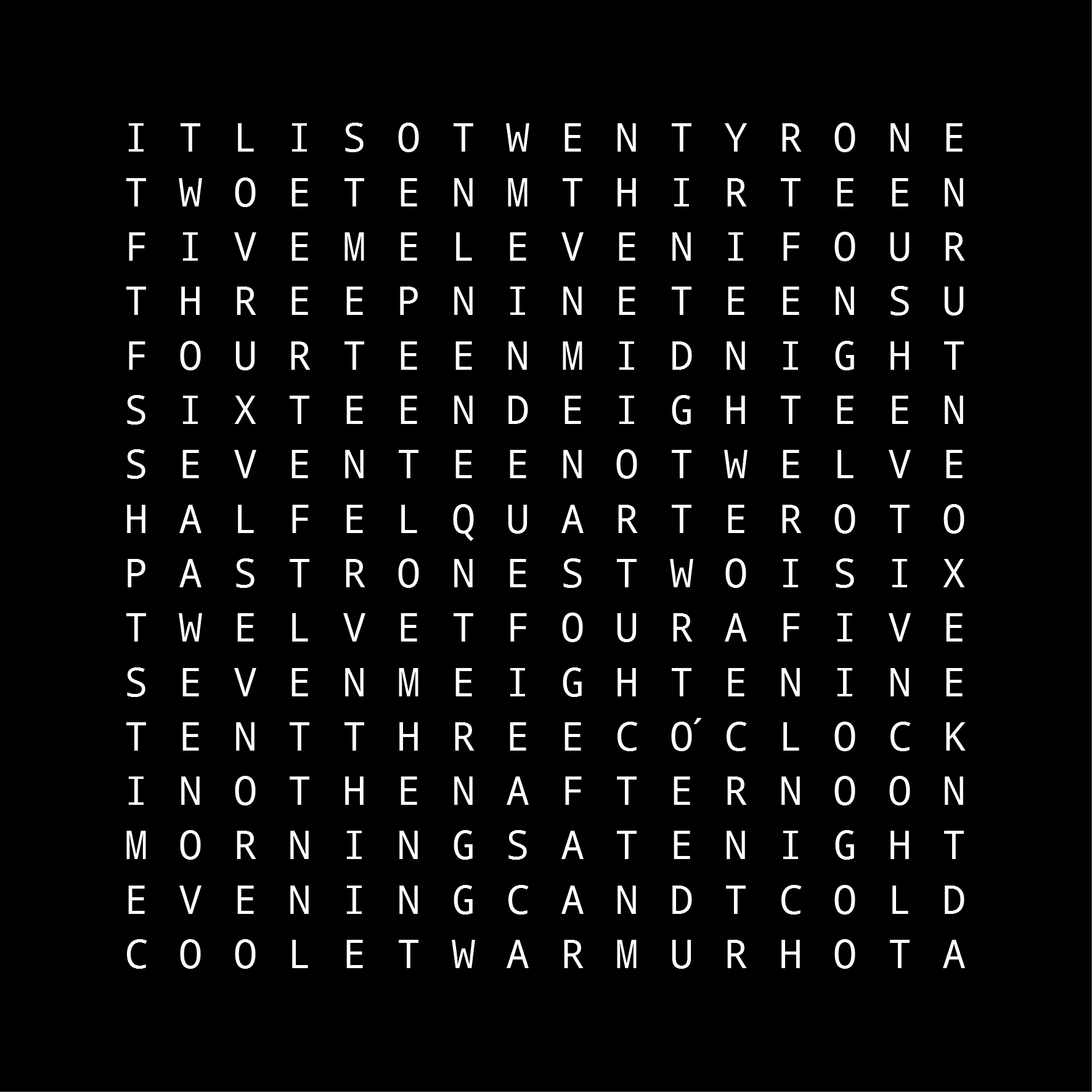
One of my inspirations for the Rotor Clock was the Instructables wordclock that tells the time (and temperature) based on a 16-by-16 grid of letters:


It looked very much like a puzzle to me, so I immediately set about trying to work out the minimum size of grid that could tell the time to an accuracy of one minute. I managed to get the grid down to 13-by-13:

TWENTYQUARTER
TWONETHIRTEEN
FOURTEENTHREE
SEVENTEENFIVE
TWELVEIGHTEEN
IDTENSIXTEENT
ELEVENINETEEN
MINUTESHALFTO
PASTBFOURNOON
MIDNIGHTWONED
THREELEVENSIX
FIVEIGHTENINE
SEVENZO'CLOCK

[I have a suspicion you can get it even smaller if you use tricks such as spelling words vertically; but, after a considerable amount of effort, I plumped for 13-by-13]

In my usual modus operandi, I then tried to optimise the heck out of the problem by hand and attempt to fit a solution into a one-kilobyte web page that works on Chrome, Firefox and Internet Explorer. For added frisson, I didn't allow myself to use non-ASCII characters nor the evil JavaScript "eval()" or its ilk. The result, World Time, takes up just 1023 bytes:


Here's a quick breakdown of the contents:

We can omit a large number HTML elements such as "DOCTYPE", "head" and "body" and dive straight into the style definitions, which are assumed by browsers to be CSS. We set all backgrounds to black, centre the table in the middle of the page and format each table cell so that a 13-by-13 grid takes up most of the viewport. The default text colour is set to very dark grey and a shadow effect is added to simulate "light bleed":


We then define a table that will hold the 169 grid characters and be accessed in the JavaScript via a identifier named "t". The string is split into 169 table cells (each one 10 characters of HTML) which are then divided into 13 rows:


Next we decode a 78-character string that has been btoa-encoded (so we adhere to our ASCII restriction). The 78 characters represent 39 pairs of offsets into the "t" grid. The first of each pair is the "start" offset (0 to 168); the second is the "end" offset plus one. These 39 pairs define tokens with even numbers identifying them thus:

           #00 = "O'CLOCK"
           #02 = "MINUTE"
           #04 = "MINUTES"
           #06 = "PAST"
           #08 = "TO"
           #10 = "HALF"
    #12 to #38 = "ONE" to "FOURTEEN" (upper portion)
           #40 = "QUARTER"
    #42 to #50 = "SIXTEEN" to "TWENTY"
           #52 = "MIDNIGHT"
    #54 to #74 = "ONE" to "ELEVEN" (lower portion)
           #76 = "NOON"

These 38 tokens constitute all the words used by the clock. See below for details of the call to "setInterval":


Next, we define a function "d()" that takes two arguments (the third argument declaration is just a short way of declaring a variable - see 140bytes for other such techniques), The first argument is the hour as an integer. The second argument is either "00" (the token for "O'CLOCK") or "" depending on requirements. The "d()" function therefore returns the hour as a string of two-digit tokens (e.g. "7400" for "ELEVEN O'CLOCK"). It has a special case for "MIDNIGHT" and "NOON" which never take the "O'CLOCK" suffix:


We define another function "g()" that takes an integer number of minutes (0 to 59) as its only argument. It returns a string of tokens representing the appropriate number of minutes as words (e.g. "(something) MINUTES" or "TWENTY (something) MINUTES", taking into consideration the exceptional cases for "ONE MINUTE", "QUARTER" and "HALF". Note that we're playing fast and loose with the type system here: the number 1202 will be converted to the string "1202" elsewhere in the program.


Next, we define an anonymous function (let's call it "storeColours") that takes one true argument ("b" is a local variable declaration again). This is called with the result of another anonymous function ("calculateColours") that takes three arguments: the current local hour, the current local minute and an empty dictionary. The "calculateColours" function constructs a full string of tokens that describe the current time. If the minute value is zero, we use the "d()" function to construct "MIDNIGHT", "NOON" or "(hour) O'CLOCK". If the minute value is less than or equal to thirty, it constructs "(something) PAST (hour)". Otherwise, if constructs "(something) TO (hour+1)". The string of tokens are split into two-digit numbers and looked up in the "s" table described above. For every letter in every word, "calculateColours" stores an HSL colour in the "c" dictionary keyed by the appropriate offset into the grid. The dictionary is then passed to "storeColours" which modifies the style text colour of each table cell in turn. Setting the colour to "" results in the text colour reverting to the colour defined in the CSS entry for "td" (i.e. very dark grey):


Finally, we invoke the "calculateColours" and "storeColours" function at most every 1000 milliseconds via the "setInterval" function mentioned above, and gracefully close the HTML tags.


A lot of the JavaScript compression came from Google Closure Compiler.

The result is a colourful clock that spells out the time in English words, uses a responsive HTML layout and takes the local timezone, changes in daylight savings and even leap-seconds into consideration.

UPDATE: 2016-06-29

I've managed to shave an additional ten bytes off the size and updated the page, but the structure and technique are essentially the same as above.

Sunday, 19 June 2016

Rotor Clock

There seems to be a bit of fad for clocks that spell out the time. There are even some online examples utilising a variety of languages. And jolly good they are too!

Spelling out the time in British English is fairly simple. Just take the local time and extract the minutes. If the value is less than thirty, express the time as

  (minutes) PAST (hour)

Otherwise, use

  (60-minutes) TO (hour+1)

There are some exceptional cases; if the minute value is zero, use

  (hour) O'CLOCK

Whereas minute values or 15, 30 and 45 are generally expressed as

  QUARTER PAST (hour)
  HALF PAST (hour)
  QUARTER TO (hour+1)

It turns out that, using the above scheme, the maximum number of characters needed to spell out the time is 32. For example:

  TWENTY SEVEN MINUTES PAST TWELVE

If we are a little bit lenient with the spacing between the words, we can prune the number of distinct characters in each position to ten (including space). This leads to an interesting configuration for a mechanical device that can spell out the time using 32 rotors of only 10 facets each.
With a little bit of CSS3 and HTML5, it's possible to produce a web page that brings such a device to life. If you further optimise the HTML, CSS and Javascript, you can present it in a single file of only 2191 bytes.