Showing posts with label flags. Show all posts

Friday, 30 July 2021

Hexworld 1: World Map

I've long been fascinated by hexagonal grids. And maps. So it was probably only a matter of time before I created a world map based on a hexagonal grid: Hexworld.

I'm certainly not the first to try this, but most of the other attempts I've seen are either low resolution or do not try to capture national boundaries.

The obvious way of generating such a map is to take an existing one (in this case, an equirectangular projection) and post-process it. I started down this track but quickly discovered that it produces ugly results. As cartographers through the ages have discovered, making political maps (as opposed to maps for navigation) is more of an art-form that a science. So I dusted off my faithful copy of Paint Shop Pro 5 and hand-filled the 100,000 or so hexagons that make up the land masses:


I initially coloured the regions using five colours (red, green, blue, yellow and pink) and then used a Wikimedia four colour map as the basis for whittling it down to four.

With the seas coloured cyan (hue 180°), it made sense to use equidistant hues for the remaining four colours: red (324°), green (108°), blue (252°) and yellow (36°).

Each "hexel" is given one of 241 unique 8-bit indices:

  • One index (0) is reserved for water,
  • 193 indices cover the current full UN member states,
  • 2 indices cover the UN observer states (Vatican and Palestine),
  • 6 indices cover disputed territories (Western Sahara, Taiwan, Abkhazia, Crimea, Kosovo and South Ossetia),
  • 28 indices cover overseas territories belonging to UN states (e.g. Falklands), and
  • One index (255) for Antarctica.

The lowest two bits of the index encodes the region's colour; except for 0 and 255, which are treated specially. The world is indeed four-colourable!

Obviously, there's no real advantage in rendering a world map using hexagons instead of rectangular pixels or arbitrary polygons. But it's a fun exercise.


Monday, 18 May 2020

United Nations Flags

There are 193 full members of the United Nations. I've put together a web page animating between those flags based on the SVG images in Wikimedia Commons.


The process was:

  1. Curate the 193 state flags plus the flag of the UN itself.
  2. Construct 194 approximations of those flags using JavaScript and HTML canvas elements.
  3. Reorder those approximations into a loop of 194 transitions based on similarity.
  4. Encode the 194 animations.
  5. Create a web page to allow the user to explore the animations.
Of course, there are 194! ÷ 2 animations needed to get between any two flags directly, but that's such an absurd number I didn't even think about trying. I did think about creating "shortcuts" between flags in the loop and minimising the number of animations between two arbitrary flags to, say, 10, but this is still a huge amount of work. I'll leave it as an exercise for the reader to work out the total number of animations required to reduce the maximum number of hops to "N".

In an ideal world, I'd animate the high-quality SVG images themselves; but that's also a task for another day ... if ever.

Tuesday, 3 April 2018

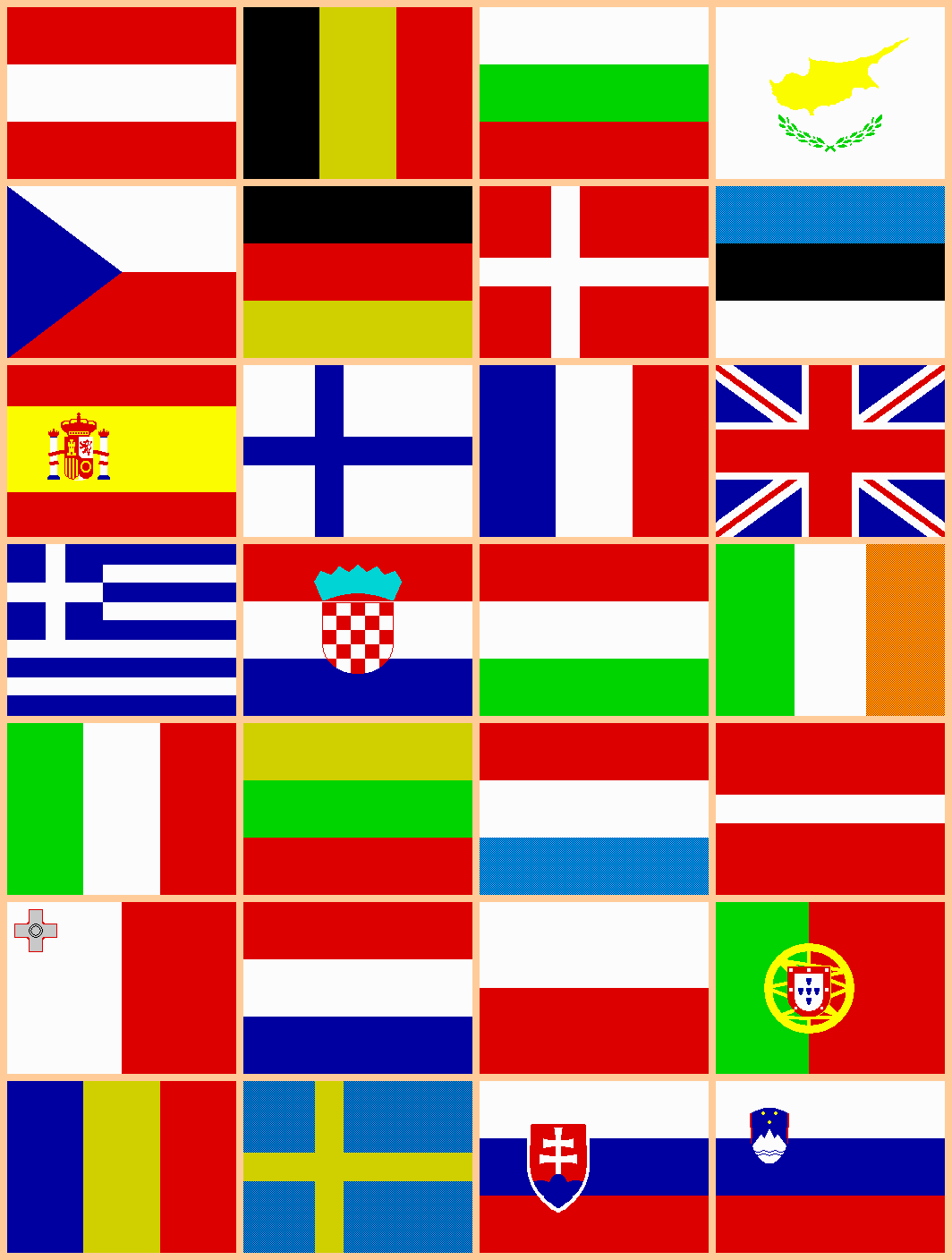
ZX Spectrum Flags of the European Union

Someone, somewhere, out there on the Internet, is looking for the flags of the twenty-eight (current) member countries of the European Union  ... in the original Sinclair ZX Spectrum SCREEN$ format. Surely...

Sunday, 10 April 2016

JavaScript Flags 3

As mentioned in the previous post, the JavaScript Flags hobby project encodes the drawing instructions for each flag as a string. For examples, the Japanese flag is encoded as
"FwCrO+0+0+72"
This is split up into a sequence of instructions or commands using a regular expression match:

  ["F", "w"], 
  ["C", "r"], 
  ["O", "+0", "+0", "+72"] 
]
The first element of each instruction is always a single upper-case letter. The remaining elements are either lower-case letters usually indicating colours (see the previous post) or signed integers (expressed as strings). Often, the integers represent coordinates. No matter what the aspect ratio of the flag, the top-left corner is always (-120,-120) and the bottom-right is (+120,+120). Two hundred and forty was chosen because it fits into a byte (although that's not important for this JavaScript implementation of the flag renderer) and is highly divisible.

The command letters are as follows:

  • "A n" — Executes the next command in the sequence "n" times, rotating about the origin by (360 ÷ "n") degrees each time.
  • "x y path ..." — Draws a path made up of a mixture of straight-line and cubic Bezier segments and fills it with the current colour. See below.
  • "C c" — Sets the current colour to "c",
  • "f w" — Draws diagonal lines of width "w". If "f" is 1, a diagonal line from top-left to bottom-right is drawn. If "f" is 2, a diagonal line from top-right to bottom-left is drawn. And if "f" is 3, both diagonals are drawn.
  • "E sx sy" — Executes the next command with scaling about the origin. If either "sx" or "sy" are negative, executes the next command twice: once with scaling (abs(sx),abs(sy)) and once with scaling (sx,sy). Otherwise, just executes the next command with scaling (sx,sy).
  • "c" — Fills the entire canvas with solid colour "c".
  • "H c y0 y1" — Draws a full-width, horizontal block in colour "c" between y0 and y1, where y0 y1.
  • "J" — Draws a union flag in the top-left quadrant.
  • "M x y path ..." — Draws a mirrored path made up of a mixture of straight-line and cubic Bezier segments and fills it with the current colour. See below.
  • "O cx cy r" — Draws and fills with the current colour a circle of radius "r" centred at (cx,cy).
  • "n c[0] ..." — Draws "n" horizontal stripes. The colour of stripe "i" (where 0 ≤ i < n) is "c[i % m]" where "m" is the number of colour arguments, c.
  • "n c[0] ..." — Draws "n" vertical stripes. The colour of stripe "i" (where 0 ≤ i < n) is "c[i % m]" where "m" is the number of colour arguments, c.
  • "R x0 y0 x1 y1" — Draws and fills an axis-aligned rectangle with the current colour between (x0,y0) and (x1,y1).
  • "x y r" or "n r1 r2 x y a" — With three arguments, draws a five-pointed star filled with the current colour at (x,y) and radius "r". With six arguments, draws an "n"-pointed star filled with the current colour at (x,y), inner radius "r1" and outer radius "r2" all rotated by "a" degrees.
  • "x0 y1 x1 y0" — Draws and fills a right-angled, axis-aligned triangle whose hypotenuse is (x0,y0) to (x1,y1).
  • "c y0 y1" — Draws a full-height, vertical block in colour "c" between x0 and x1, where x0 x1.
  • "c w x" — Draws an axis-aligned cross of width "w" in colour "c". The vertical bar passed through the x-axis at "x", The horizontal bar is along the x-axis.
  • "Y n dx dy" — Executes the next command in the sequence "n" times, translating by (dx,dy) after each iteration.
  • "x0 y0 x1 y1" — Zooms in to a rectangle (x0,y0) and (x1,y1) where x0 < x1 and y0 < y1. All subsequent commands assume the 240-by-240 canvas is now (x0,y0) to (x1,y1).
The paths for the "B" and "M" commands start and finish at (x,y). The intervening points are prefixed by a lower-case letter:
  • "x y" — Lower-case "L" — A straight-line segment  from the previous point to (x,y).
  • "s x1 y1 x y" — Lower-case "S" — A smooth cubic Bezier segment from the previous point to (x,y) with control point (x1,y1).
  • "c x1 y1 x2 y2 x y" — Lower-case "C" — A general cubic Bezier segment from the previous point to (x,y) with control points (x1,y1) and  (x2,y2).
For the "M" command, the path is mirrored about a vertical axis centred on the final point of the explicitly-specified path. This allows emblems such as the double-headed Albanian eagle to be encoded very efficiently.

In summary, less than twenty commands encode the instructions for drawing most of the world's flags very effectively. The use of regular expression string splitting and function lookup maps in JavaScript makes the encoded strings short whilst keeping the decoding code equally concise,

Sunday, 13 March 2016

JavaScript Flags 2

As promised, I thought I'd take time to document some of the code behind my JavaScript flags hobby project. If you look at the data file for the flags, flagdata.js, you'll see a single JSONP-style JavaScript call:
Flags({
  AD:["Andorra",10/7,"..."],
  ...
  BL:["Saint-Barthelemy","FR"],
  ...
  JP:["Japan",3/2,"FwCrO+0+0+72"],
  ...
  ZW:["Zimbabwe",2,"..."]
});
The single argument is an object with ISO-3166 two-letter codes as keys and arrays of two or three elements as values. If the array has three elements, they are:
  1. The country or territory name, as a string;
  2. The flag's aspect ratio, as a rational floating-point number; and
  3. The instructions for drawing the flag, as a string (see below).
If the array has only two elements, they are:
  1. The country or territory name, as a string;
  2. The ISO-3166 code of the "parent" country whose flag this entry shares, as a two letter string.
The latter scheme allows "aliases" to be set up for flags that are shared by more than one territory:
  • France
  • Netherlands
  • Norway
  • United States of America
The instructions for drawing the flags as represented as a string. The pseudo-BNF of these instructions is as follows:
instructions ::= instruction ... 
instruction ::= command argument … 
command ::= 'A'..'Z' 
argument ::= number | colour 
number ::= sign digit ... 
sign ::= '+' | '-' 
digit ::= '0'..'9' 
colour ::= 'a'..'z'
It is therefore trivial to parse these instruction streams using regular expressions. For example, Japan has the following entry:
JP:["Japan",3/2,"FwCrO+0+0+72"]
The instruction stream can be split into individual instructions using:
instructions.match(/([A-Z][^A-Z]*)/g)
This produces an array:
["Fw", "Cr", "O+0+0+72"]
These three instructions can be further divided into numbers (which are always preceded with a sign) and single-letter colours:
instruction.match(/.\d*/g)
This produces an array for each instruction:
[
  ["F", "w"],
  ["C", "r"],
  ["O", "+0", "+0", "+72"]
]
The first element is thus always an upper-case letter and is used as the key into a map for commands. I'll discuss the meaning of each letter (command) next time. Subsequent elements in the instruction array are arguments to the command: numbers and/or colours. Colours are always lower-case letters:
a: #39F light-blue
b: #00F medium-blue
c: #009 dark-blue
g: #CCC grey
m: #630 brown
n: #000 black
o: #F60 dark-orange
p: #F90 light-orange
r: #F00 bright-red
s: #C00 medium-red
t: #900 dark-red
u: #060 dark-green
v: #090 medium-green
w: #FFF white
y: #FF0 yellow
But for now, we'll finish off the Japanese flag example by expanding the instruction arrays:
fill white
colour bright-red
circle +0 +0 +72
This would get translated by the JavaScript code in flags.js to the following pseudo-SVG:
svg viewbox="0 0 360 240" xmlns="http://www.w3.org/2000/svg"
  g stroke="none" transform="matrix(1.5,0,0,-1,180,120)"
    g
      rect fill="#FFF" height="240" width="240" x="-120" y="-120" /
      ellipse cx="+0" cy="+0" fill="#F00" rx="48" ry="+72" /
    /g
  /g
/svg

Sunday, 31 January 2016

JavaScript Flags 1

A few of my previous hobby projects have used a library of vector graphics approximations of the flags of the world. I decided to re-use that data in a JavaScript web page that draws those flags as SVG images.

In subsequent posts, I'll describe the data encoding for those flags and some of the compression techniques I used.